
VINELink Coverage in Perry County
Mississippi's program goes by SAVIN. The official Mississippi SAVIN service works with VINELink. It keeps registration confidential while tracking custody events. State guidance covers MDOC custody plus county facilities that have joined. The Perry County Jail is not named there. So run a Perry search and ask SAVIN or PCSO to confirm participation before relying on it.
Know what the system is not. It offers no mugshot archive, no warrant search, and no court docket. A county registration can carry forward into state custody through the state's Registration Link. This applies once a felony conviction or transfer moves the person into MDOC.
Search Perry Custody on VINELink
Start at the official portal and match identifiers carefully, since two people with similar names can both come back in one search.
- Open VINELink and select Mississippi.
- Choose the person or offender search and enter the available identifying information.
- Review any matches for the correct facility and identifying details.
- Open the matching custody record and look for registration controls.
- If no Perry record appears, call SAVIN or the sheriff rather than assuming no arrest occurred.
The captured VINELink screen shows the search entry point without exposing personal data.

Select Mississippi before entering the details for a specific custody check.
What Perry VINELink Results Mean
The exact fields shown depend on the participating agency and the custody level, so treat each result as a status snapshot.
| Result item | Meaning |
|---|---|
| Custody status | The status sent by the participating jail or MDOC. |
| Facility | The reported place of custody, which can change after transfer. |
| Offender identifier | A stronger match than name alone when available. |
| Event | Release, return, transfer, escape, or supervision change reported by the source. |
| Registration option | The available channels for notices tied to that record. |
A status event says nothing about how the charge turns out, and the court-disposition path answers that question instead.
Register for Mississippi Custody Alerts
Per the SAVIN notification page, anyone may register by phone or on the web without giving a name. Registration attaches to a custody record that comes back from a search.
- Open the correct person record.
- Select the available registration option.
- Choose the offered contact method and follow the confirmation prompts.
- Keep the confirmation details needed to manage notices.
- Update registration if the system asks after a move into state custody.
Help lines include the SAVIN office at 601-359-5759, the 24-hour line at 1-888-9-MSSAVIN, and TTY 866-847-1298. Expect more than one notice when custody changes several times.
Perry VINELink Limits and Confirmation
VINELink runs on electronic booking files from participating agencies. A fresh Perry arrest may not show up right away, and someone released from custody can be hard to find later. It is no substitute for a booking report or a final court disposition.
Federal custody sits on entirely separate systems. The Bureau of Prisons locator handles federal prisoners, while the ICE locator covers immigration detention. Neither one provides a Perry County booking photo. The BOP search form itself shows how distinct the federal channel is.
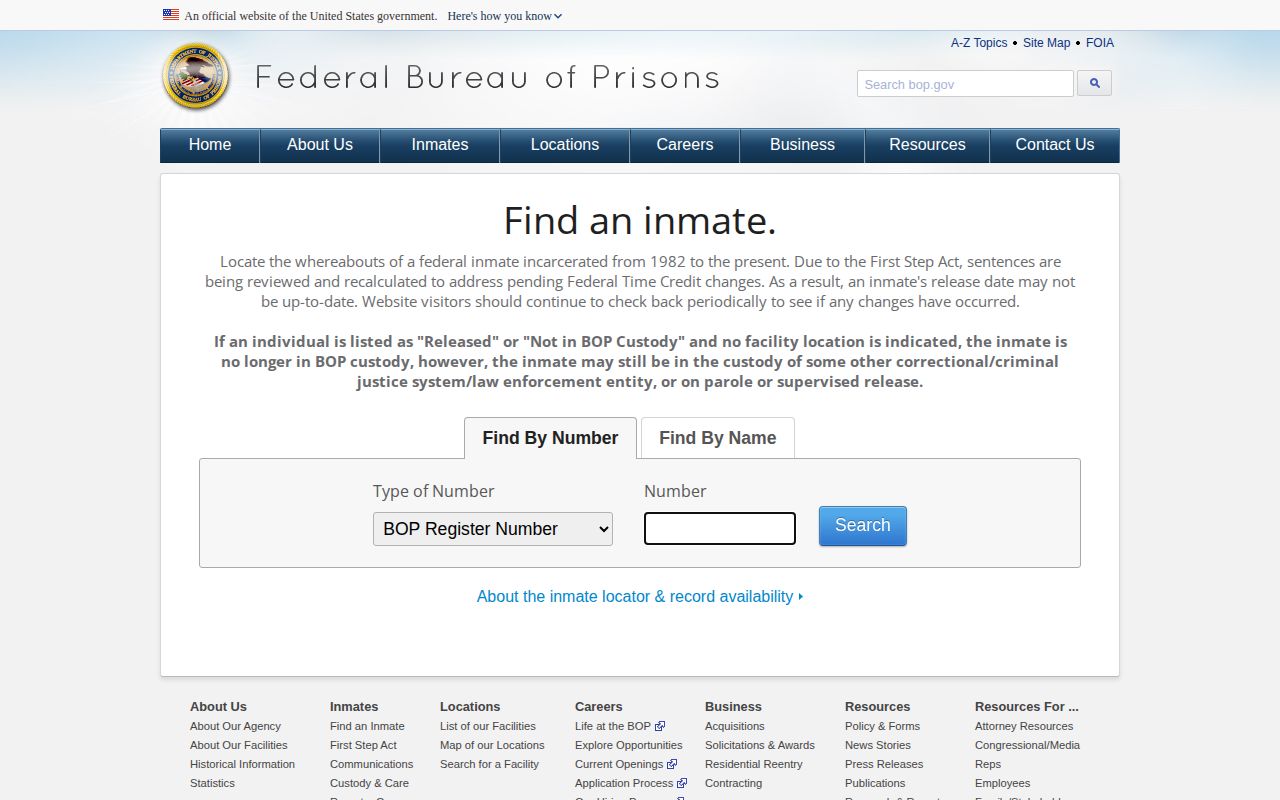
Use it only when federal custody is the actual question.
When Perry Custody Moves to MDOC
Someone freshly booked at the county jail may never surface in the MDOC inmate search. That tool serves state custody. It also handles supervision. It accepts a first name, last name, or MDOC ID. After sentencing and a transfer, it becomes the more useful official locator. The MDOC form displays the state-level fields you would fill in.
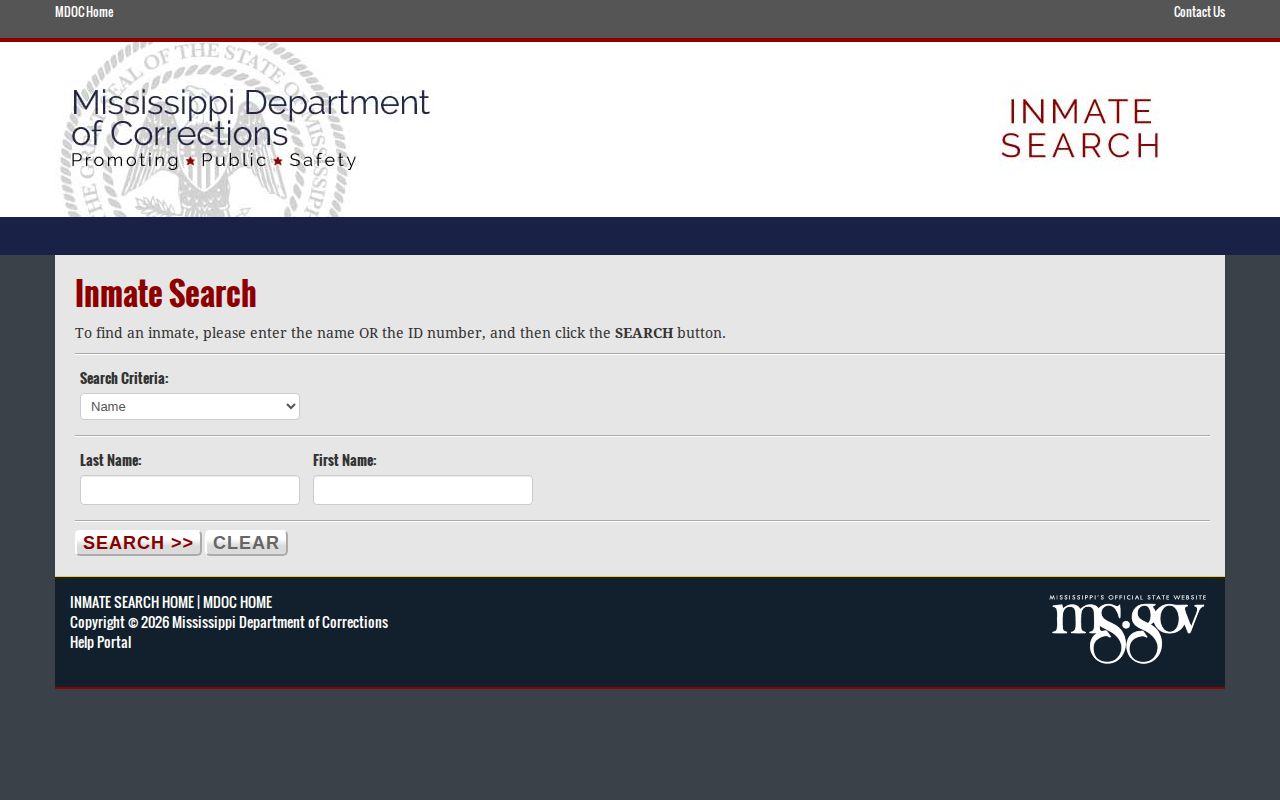
A state match represents a different custody stage from the original Perry booking.
Mississippi SAVIN Event Types
Release notices are only part of what SAVIN sends. State guidance lists rehousing, transfer, temporary movement, return to custody, escape, absconding from supervision, and release. One sequence of changes can trigger several notices. Verify a notice whenever safety or travel hinges on it.
MDOC says registration stays anonymous, though delivery choices live in the active record. Do not count on memory or an old message. Open the current result, and call SAVIN if any wording is unclear.
VINE and the courts answer different questions. VINE may tell you where a person is held. It cannot tell you whether a charge was dismissed, reduced, or ended in conviction, so turn to Perry's clerks for disposition.
When Perry VINELink Finds Nothing
Start with spelling, state selection, and any identifiers you have. A brand-new intake may not have reached VINE yet. The person could also sit in a nonparticipating facility or under a different custody system. Perry County Jail participation is not confirmed in official material. So an empty result settles nothing.
For current county custody, call PCSO at 601-964-8461. For help with the state notification service, use 601-359-5759 or the 24-hour 1-888-9-MSSAVIN line. Search MDOC by name or ID once a conviction moves the person into state custody. Federal and immigration custody fall outside both routes.
A released person may vanish from custody tools entirely. The booking record, incident report, and court case are separate records that can endure. Request each from its custodian when you need historical proof.
Manage Perry Custody Notices Safely
Treat every notice as a prompt to verify. A transfer message could mean rehousing, temporary movement, or a shift to another custody level. Multiple messages may describe one sequence. Keep the SAVIN help numbers close and read the current VINELink record to interpret the event.
Anchor registration to the right individual record. Compare identifier and facility fields before choosing alerts. Never enter another person's details just to test the service. If a matching county record offers no registration option, ask SAVIN whether that facility supports notifications.
VINELink has one job: location and custody changes. It sets no bond, resolves no warrants, corrects no booking photo, and reports no final judgment. PCSO handles booking details, and the clerks handle the case.
County-to-State Registration Link
Mississippi builds in a Registration Link for this. It moves a county-level notification to state custody after a felony conviction or a transfer. That handoff matters. The jail and MDOC are separate custodians. An alert chain can follow a person across both. When you register, follow the prompts attached to the matching record. Skip any unrelated search result.
Not every transfer means a sentence was final. Temporary movement and rehousing count as reported event types too. Before reading too much into a notice, check the court disposition and the current facility. If several alerts land close together, SAVIN staff can walk you through the sequence.
Custody awareness is the job this service does. It is not a booking photo source, a full arrest history, or a warrant system. Those questions still belong to official court and agency records.
Verify Each Perry Alert
Write down the event label, the time, and the named facility. Also note the identifier in each notice. Then open VINELink at its official address instead of tapping a link inside a message. Compare the live record against the notice. If details conflict, call SAVIN.
Each event type needs its own check. A release call should be confirmed with the facility when safety planning depends on it. A transfer alert means asking where custody moved. It could be another county, MDOC, or a different system. A return event is not automatically a new Perry arrest.
Keep contact settings current, too. A dead email or a changed phone number can break the alert chain. The registration can stay valid the whole time. SAVIN support can explain delivery options without touching the court case itself.